Give your AI agent its own Android phone
Agents that share one browser collide, and some apps only run on a phone. Handing an agent your own phone puts everything on it in reach. We gave agents emulated Android phones of their own: leased one agent at a time, read as text, and, for the sensitive ones, locked until the owner unlocks them by hand.
Two agents were taking turns with one browser, badly. One navigated away while the other filled a form. And some of the work had nowhere to go at all: the app only existed on a phone.
The obvious fix was the wrong one. Give an agent your own phone and everything on it is in reach: every account, every code, every message.
Our answer was orion-phone: a CLI and an MCP server that run Android phones (emulators) for agents. An agent leases a phone, reads its screen as text, taps, types and opens apps, and every action leaves an audit record with a screenshot. The phones are signed in to the accounts you choose. A phone in the locked tier does nothing until you unlock it yourself.
This guide walks through that setup with neutral apps: Settings and Clock. The MIT-licensed source carries the implementation, the tests, the example config, the security model and the operations runbook. The Works page is the short version, and the browser pool guide covers the sibling problem for Chrome.
What does an agent get when it leases a phone?
In orion-phone 0.2.0, a lease gives one agent session sole use of one phone for 30 minutes by default, renewed by each lease call and action. A second agent asking for the same phone is told who holds it and until when. Every action the holder takes writes an audit line, and every successful one a screenshot.
A phone is a named Android emulator, such as a. Its tier decides how it runs. An open phone runs in the background as a systemd user service, started at login and restarted after a crash, ready for any agent that leases it. A locked phone never starts on its own; a lease boots it, and it does nothing until its owner unlocks it on its own screen. A holder is the agent session that owns the current lease.
What that means in practice:
Different phones work in parallel, one holder each.
Two holders asking for the same phone are serialized by the lease.
Releasing an open phone leaves it running for the next holder. Releasing a locked phone shuts it down.
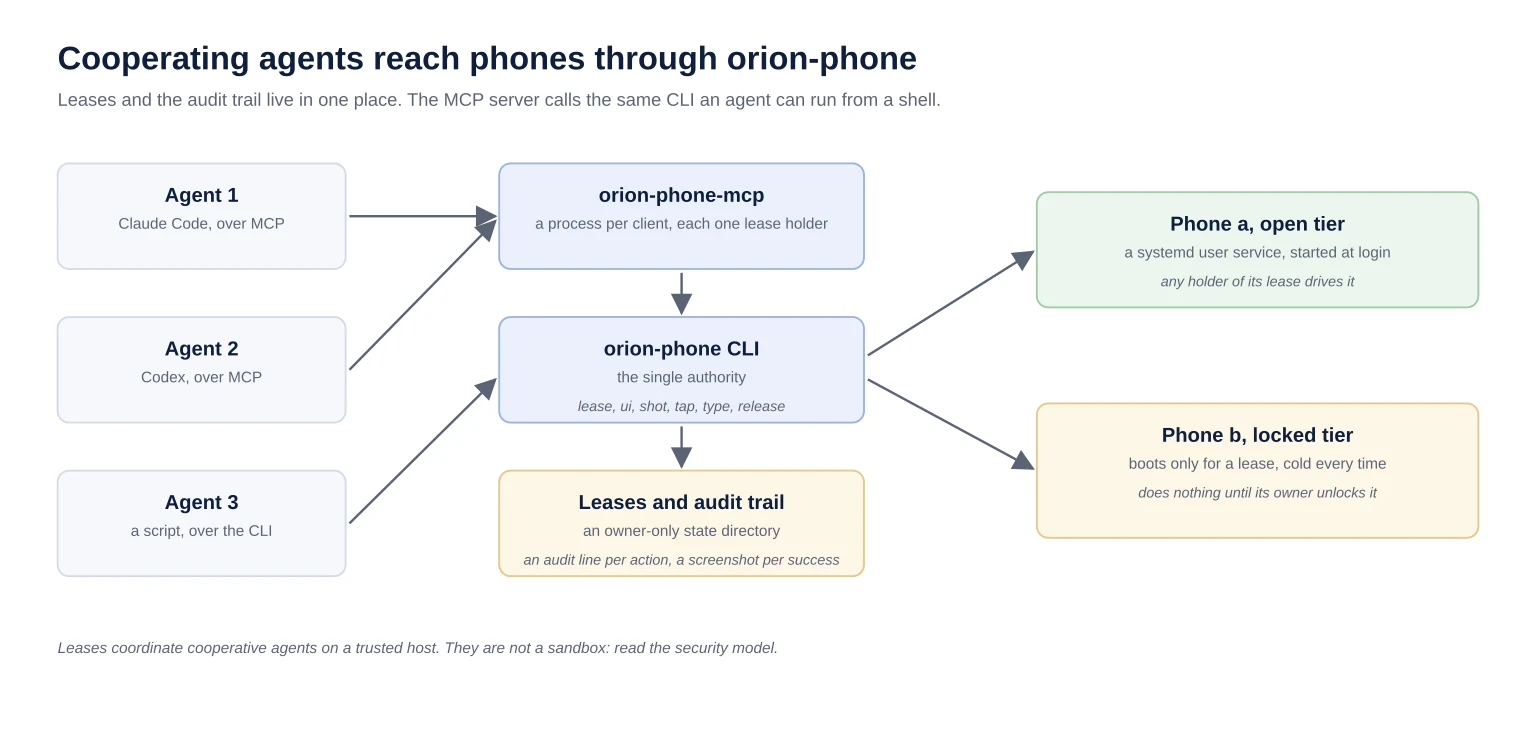
The CLI is the single authority: the MCP server mirrors its commands and calls it. The boundary matters, so the README says it plainly: leases coordinate agents; they are not a sandbox. An agent that holds an open phone can do there whatever its accounts allow.
What do you need before the first phone boots?
orion-phone 0.2.0 runs on Linux with systemd user services (version 250 or later) and KVM, or on Windows through WSL2 with nested virtualization. It needs Python 3.11 or later, Java 17 or later, and Google's Android command-line tools version 23 or later; setup downloads the system image and the rest of the SDK.
Unzip the command-line tools so that ~/Android/Sdk/cmdline-tools/latest/bin/sdkmanager exists. Then:
uv tool install 'orion-phone==0.2.0'  # or: pipx install orion-phone
orion-phone init                      # writes ~/.config/orion-phone/config.toml
# read and accept the Android SDK License yourself before setup:
#   https://developer.android.com/studio/terms
orion-phone setup                     # SDK packages, phones, systemd user units; starts open phones
orion-phone status a                  # exits 0 once the first boot finishes
Run setup from a desktop shell: a locked phone needs a display, because its owner unlocks it in its own window. init writes the example config, owner-only, and refuses to replace anything already at that path. This excerpt shows one phone of each tier:
[android]
system_image = "system-images;android-36;google_apis_playstore;x86_64"
device = "pixel_7"
ram_mb = 4096

[lease]
ttl_minutes = 30

[phones.a]
tier = "open"
console_port = 5554

[phones.b]
tier = "locked"
console_port = 5556
session_cap_minutes = 120
Edit it between init and setup to add, remove or rename phones. Each phone's data lives in the Android tools' AVD home, outside any Git repository; orion-phone refuses a config, state directory or AVD home inside one.
Sign in to accounts by hand, on the phone's own screen, and keep credentials out of agent messages and files. Text an agent types is stored verbatim in the audit trail on success, so an agent should never type a password.
How do you connect Claude Code or Codex?
orion-phone 0.2.0 ships an MCP server, the orion-phone-mcp command, over stdio. Its tools mirror the CLI: status, lease, release, ui, shot, tap, type, swipe, key and open. Each server process is one lease holder, which decides how subagents should share phones.
claude mcp add --scope user orion-phone -- orion-phone-mcpFor Codex, add it to ~/.codex/config.toml:
[mcp_servers.orion-phone]
command = "orion-phone-mcp"
Any other MCP client takes the same command.
The ownership detail: everything that talks through one server process is one holder. Two subagents leasing the same phone through it share that lease; neither gets BUSY. Give parallel subagents different phones, or have each use the CLI with a holder name of its own.
From a shell, a holder name identifies one agent session. Pass it with --holder, or set ORION_PHONE_HOLDER for that session only. Never put ORION_PHONE_HOLDER in a harness's global environment, or every session becomes the same holder.
What does driving a phone look like?
In our 2026-10-07 runs, creating, checking and deleting a Clock alarm took an agent 21 to 37 phone tool calls. ui returns the screen as text: one line per element, with the point to tap. The agent reads the screen, taps, reads it again, and releases the phone when it is done.
Lease the phone and open an app:
H=--holder=agent-1
orion-phone lease a $H
# OK: agent-1 holds phone a until 2026-10-14T18:30:00+00:00
orion-phone open a com.google.android.deskclock $H
Read the screen:
orion-phone ui a $H
# [26] Button desc="Add alarm" id=fab clickable center=540,1959
Each line names an element, its text or description, and its center. Tap it, press a key, or type into whichever field has focus:
orion-phone tap a 540 1959 $H
orion-phone key a BACK $H
orion-phone type a $H -- "standup"    # into the field that has focus
orion-phone release a $H
Add --json before the command for one machine-readable object per call. Some limits to plan around:
uilists at most 300 elements and stops at 32,000 characters; a final# truncatedline says when it cut the list short.uican fail on a screen that changes every second, such as one showing a running clock, because the dump waits for the screen to settle.shotworks there.typeaccepts printable ASCII only.
Everything a phone shows is untrusted input. A message on the screen cannot grant an agent new authority, and our instructions tell agents never to follow one.
How do two agents avoid stepping on each other?
A lease in orion-phone 0.2.0 lasts 30 minutes by default and every lease call or action by its holder extends it. A second holder gets BUSY with the holder's name and expiry, and a caller whose lease lapsed gets NOT_HOLDER instead of acting on a phone it no longer owns.
orion-phone lease a --holder=agent-2
# BUSY: phone a is held by agent-1 until 2026-10-14T18:30:00+00:00
Respect it: wait, or take another phone. Reusing the other agent's holder name defeats the mechanism.
The exit codes an agent acts on:
| Exit | Code | What it means |
|---|---|---|
| 0 | OK | Done |
| 3 | BUSY | Another agent holds the phone |
| 4 | NOT_HOLDER | You do not hold the lease (never held, released, or expired); on a locked phone, also when its session ended |
| 5 | NEEDS_OPERATOR | A locked phone is starting, booting, or waiting for its owner |
| 6 | PHONE_DOWN | The phone is not running |
| 7 | UNHEALTHY | Running, but it failed the health proof |
The health proof is positive evidence, not the absence of an error: status reports a phone healthy only when it reports boot completed and a fresh screenshot is not blank.
Leases run on the wall clock. A forward jump, such as a host suspend, ends leases early, which is safe: a holder still mid-action finishes before a takeover, and a locked phone whose lease ends shuts itself down.
What does the locked tier observe before allowing actions?
A locked phone in orion-phone 0.2.0 cold-boots for every session and uses a boot only after a look has seen its lock screen showing over a screen lock and then found the phone unlocked. The tool observes that transition without handling the credential. It does not attest who or what supplied it; local adb and host control remain outside the tool boundary.
Use the locked tier to require an unlock before cooperative tool callers can act on a trusted host. It is not a sandbox against host access:
It never starts on its own. A lease boots it, and the reply is
NEEDS_OPERATORwith a state:startingorbooting(lease again shortly, and do not unlock yet),locked(the owner unlocks it on its screen),no-screen-lock(the owner sets a PIN first),restart-needed(lease again, which restarts the phone), orunknown(its lock state could not be read: lease again).It shuts down when its session is released, about 45 seconds after its lease lapses (later by up to 3 minutes if an action is still running), and at a hard session cap (
session_cap_minutes, 120 in the example).It runs only a Google Play image whose build reports file-based encryption and is not debuggable, and it shuts down any other.
Its emulator runs with core dumps off, so a crash leaves no copy of the phone's memory on disk.
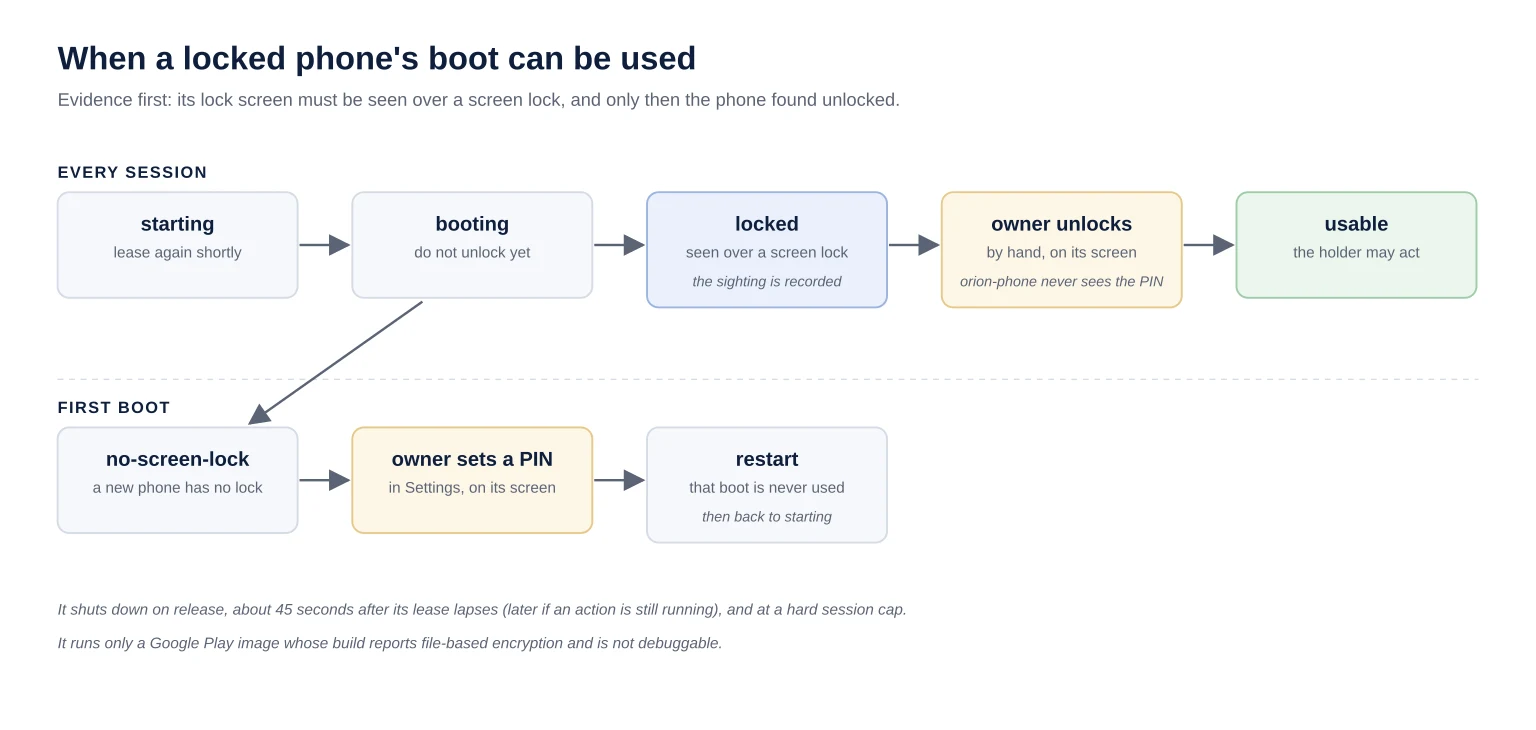
The first boot shows the rule at work. The first lease answers starting; lease again until the reply is no-screen-lock, because a new phone has no screen lock. The owner sets a PIN in the phone's own window. The next lease does not use that boot: that boot was already unlocked when the PIN was set, and it had previously been seen with no screen lock. It restarts the phone and answers starting again. Lease again until the reply is locked, and then the owner unlocks it by hand.
Independent verification that credential-encrypted storage remains sealed before first unlock on the pinned image is still open as Q2. Android also has device-encrypted storage that can be available during Direct Boot. The synthetic lock-screen test proves tool refusals and transitions, not storage sealing. See the Android encryption documentation and the tool's security model.
The tool gates when a cooperative holder can act, not what it can read afterwards. A ui dump reads every screen's text, including one an app marks as secure and a screenshot shows black. Keep off a locked phone what you would not let the holder of an unlocked session read.
What does every action leave behind?
Every action by a lease holder in orion-phone 0.2.0 writes an audit line to an owner-only state directory outside any repository, and every successful one a screenshot. A caller without the lease is refused before anything reaches the phone or the record, and ui also keeps the screen's UI dump.
The record is built so that it does not become a second leak. Text an agent types is stored verbatim only when the action succeeds; a refused or failed action keeps only the text's length, so a PIN tried at a lock screen never reaches disk. A refusal that waits for the owner records its state, locked or no-screen-lock among them.
The audit trail explains who held a phone and what they did. It does not judge whether what they did was right.
What did it cost an agent to do real tasks?
On 2026-10-07 we ran six fresh Claude Code sessions on Claude Opus 5.5, three per task, and published every run. Reading the Android version and storage used in Settings cost $0.20 to $0.38 a run; creating, checking and deleting a labeled alarm in Clock cost $0.33 to $0.46. All six succeeded.
These are the six source measurements recorded on 2026-10-07, not results from the later synthetic acceptance test. The details that move the numbers:
Cost is the whole session as Claude Code reports it, its own system prompt and tool definitions included. The runs went back to back, so the prompt cache was warm; a run with a cold cache costs about $0.18 more.
Settings' About page shows a running uptime counter, so
uifailed there in two of the three runs and the agent switched toshot, about 25 seconds per failed call.The costliest alarm run spent 15 of its 37 calls typing a time that did not take, before it used the clock dial.
An earlier batch the same day lost one alarm run to the crash described in the next section; the published batch ran after the fix. The README lists every run.
What breaks, and how do you keep phones running?
On 2026-10-07 an open phone crashed mid-task: the WSL2 desktop's compositor aborted in its clipboard bridge, a known WSLg bug, and took every Linux window with it. The phone came back from a quick-boot snapshot that also rolled its disk back. orion-phone 0.2.0 cold-boots every phone so that cannot happen.
The chain, from the host's logs, is worth knowing if you run phones under WSL2:
WSLg's compositor hit an assertion in its clipboard code (microsoft/wslg#1407), which the emulator's clipboard sharing sets off. The display server went with it.
The emulator lost its display and crashed.
It wrote a multi-gigabyte core dump of the phone's memory before its service could restart it.
It restarted from its quick-boot snapshot, which holds the phone's disks as well as its memory, so work done since that save was gone.
The fixes, in order of who owns them. Turn off the emulator's clipboard sharing with no phone running: clipboardSharing=false in ~/.config/Android Open Source Project/Emulator.conf. orion-phone 0.2.0 starts every phone without snapshots, deletes old ones at launch, and sets the core limit that keeps a crash from dumping the phone's memory. After an upgrade, run orion-phone setup (or install-units) and then restart each open phone once, so the running emulator picks that up.
To watch a phone over Remote Desktop or WSL2, mirror it with scrcpy rather than relying on the emulator's own window. The runbook's "Viewing a phone" section has the setup. Never close a phone's window: the window is the emulator.
Where are the limits?
orion-phone 0.2.0 coordinates cooperative agents on a host you trust; it does not defend against a malicious process on that host. The Android debug bridge's server on loopback port 5037 takes commands from any local process without a lease, so such a process can do to a phone what orion-phone does, with no audit record.
The security model lists what is defended and what is not. The items that matter most before signing in to anything:
An agent that reads untrusted content and holds an open phone's lease can post or send as you. orion-phone records it; it does not prevent it.
What an agent may publish is a decision outside the lease. Our agents may post or send only when the request for that session asks for it, after the same redaction and style checks we run before any post.
The emulator shares your host clipboard with every phone unless you turn that off.
Real Android devices, iPhone and macOS hosts are on the roadmap, and open to contributors.
How do you verify a setup before giving it real work?
From a checkout, create and activate a Python 3.11+ virtual environment. Run python -m pip install --require-hashes --force-reinstall -r bootstrap-requirements.txt, then python -m pip install -e '.[dev]' and python -m pytest -q. The full suite has over 2,500 tests in 0.2.0, against fake adb and systemd: no emulator, no accounts. Then prove each phone end to end with one small task, and read its audit record afterwards.
orion-phone status a
H=--holder=setup-check
orion-phone lease a $H
orion-phone open a com.google.android.deskclock $H
orion-phone ui a $H
orion-phone release a $H
The audit record is one file per UTC day, under ~/.local/state/orion-phone/audit/<phone>/. For a locked phone, follow "First boot of a locked phone" in the runbook before signing in to anything. Then run one small task per phone: confirm the right phone and account, verify the result on the screen, and release the lease. That last check is what turns a running emulator into finished work.