A browser pool for agents that stop taking each other's tabs
One shared browser becomes a shared cursor, shared focus, and shared sign-in state. We moved browser work into an identity-based pool: a persistent profile for each identity, a virtual screen for each browser, and a lease for the agent using it.
Two agents can have separate conversations and still be fighting over the same browser. One navigates away while the other is filling a form. A tab changes identity halfway through a task. The operator moves another window in front of Chrome, and an editor stops behaving as expected.
The browser had become shared mutable state with no owner.
Our answer was orion-browser: a small CLI and MCP server that gives cooperative agents a pool of signed-in Chrome browsers. Each configured identity has a persistent profile and its own virtual screen. An agent takes a time-limited lease, connects its existing browser driver to the returned DevTools endpoint, does its work, and releases the browser.
This guide explains that setup using generic identities. The MIT-licensed source includes the implementation, synthetic tests, example configuration, security model, and operations runbook. The Works page is the shorter overview.
What the pool separates
A browser is a named identity, such as work or anon. Its profile holds cookies, settings, and sign-in state across runs. A session is one running Chrome process. A holder is the agent session that owns the browser's current lease.
These distinctions determine what can happen in parallel:
Different identities can run at the same time, on different virtual screens.
Different holders asking for the same identity are serialized by the lease.
Tabs inside one browser still share that browser and its identity. Making another tab does not create another lease.
Releasing a browser ends its running session; it keeps the profile for the next session.
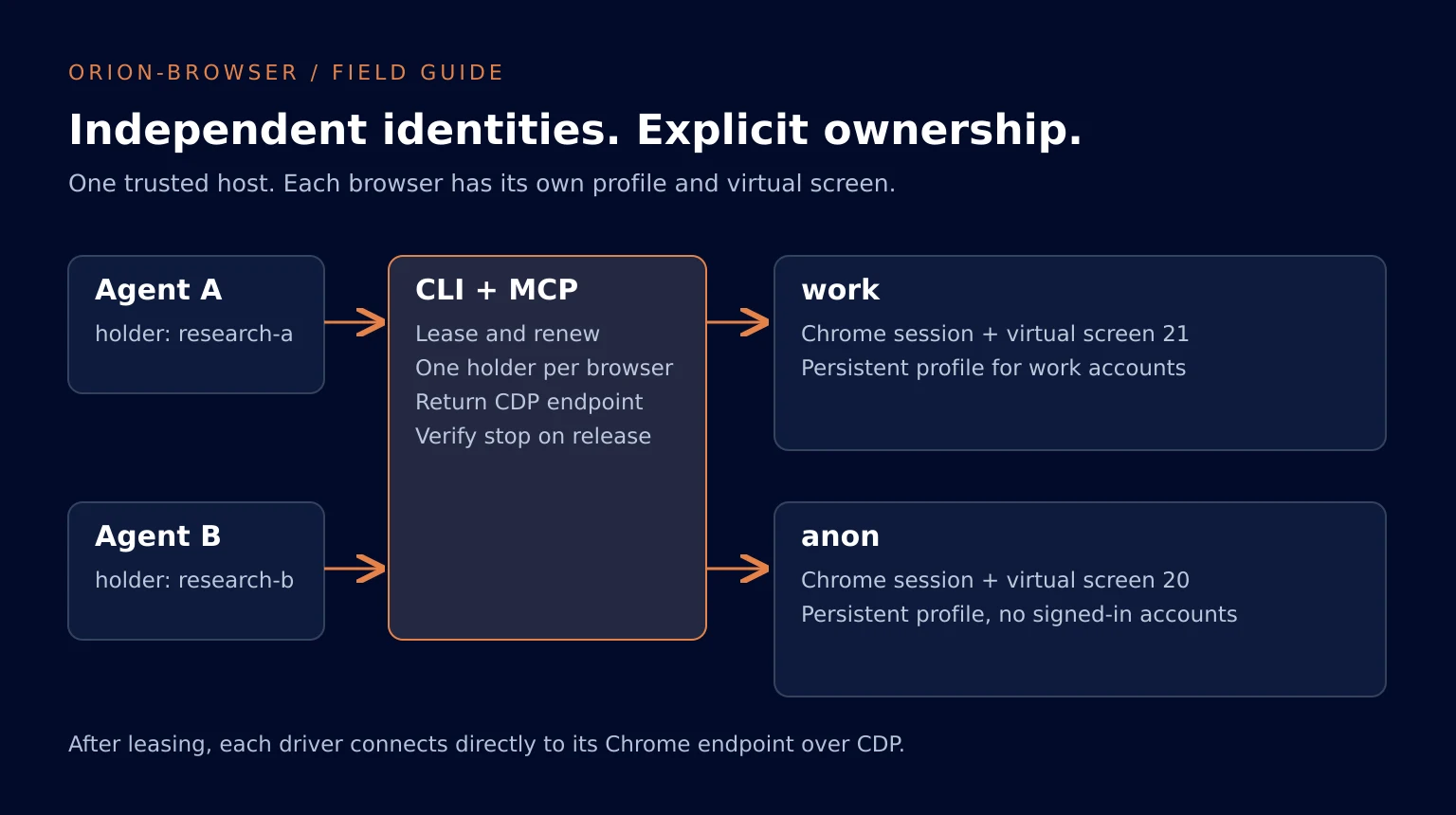
We use headful Google Chrome on a virtual display served by TigerVNC, with noVNC for the operator's view. A systemd user service owns each running session. The agent's command can exit without taking the browser down with it.
The lease service does not forward clicks or interpret page actions. It returns a CDP endpoint; tools such as agent-browser or Playwright connect directly. That keeps the integration small, but it also defines the trust boundary: this is coordination for agents on a trusted host, not isolation between untrusted tenants.
Start with two generic identities
The host needs Linux with a working systemd user instance, Python 3.11 or later, and Google Chrome stable installed from Google's package. WSL2 can provide the Linux environment when systemd is enabled. The browser driver runs on the same host as the loopback endpoint.
On an Ubuntu-style host, the operator installs the supporting display packages:
sudo apt install tigervnc-standalone-server novnc websockify x11-apps xdotoolInstall the tagged source in a virtual environment:
git clone --branch v0.1.0 https://github.com/OrionArchitekton/orion-browser-oss.git
cd orion-browser-oss
python3 -m venv .venv
. .venv/bin/activate
python -m pip install .
mkdir -p ~/.config/orion-browser
cp config.example.toml ~/.config/orion-browser/config.toml
The Python package and commands are named orion-browser. The public GitHub repository is named orion-browser-oss. Chrome and the distribution packages are separate dependencies with their own licenses; the MIT release does not bundle them.
The example configuration includes:
[chrome]
path = "/usr/bin/google-chrome"

[screen]
width = 1920
height = 1080

[lease]
ttl_minutes = 30
max_minutes = 240

[[browser]]
name = "anon"
screen = 20

[[browser]]
name = "work"
screen = 21
Keep anon signed in to nothing. Give work only the accounts needed for its tasks. Add more identities when independent account groups need concurrent use, not merely because there are more agents.
Browser names must be unique and contain 1 to 16 lowercase letters or digits. Screen numbers must be unique and between 10 and 99. Reserve browser name smoke and screen 89 for the optional real-browser smoke test.
Run the setup check:
orion-browser setup
orion-browser --json status
Setup checks dependencies and creates owner-only directories. It does not install packages or run as root. Profiles default to ~/.local/share/orion-browser/profiles; state defaults to ~/.local/state/orion-browser. Keep both outside Git repositories. Downloads also belong outside source control.
These dedicated profiles matter independently of leases. Chrome's remote debugging guidance requires a non-default user-data directory for remote debugging of regular Chrome from version 136 onward. Do not point a pool browser at your everyday profile.
Sign in once, as the operator
The operator takes a lease before typing credentials. This prevents a cooperative agent from taking the same browser during sign-in.
orion-browser lease work --holder operator --minutes 60
orion-browser view work --drive --holder operator
Open the returned drive link and sign in on the site's own page. Keep credentials and second-factor codes out of agent messages and files. Decline Chrome account sync: syncing a personal browser account can copy more passwords and history into this agent-accessible profile than the task needs.
Then release the browser:
orion-browser release work --holder operatorCheck that the result reports stop: clean. Lease it again, open the drive view, and verify the needed site remains signed in. The persistence check is per platform; a saved profile cannot promise that every site will accept a session indefinitely.
If a platform depends on restoring its session, the browser's configuration supports restore_session = true. Enable it deliberately and repeat the stop/start check. Keeping tabs open is a different decision from keeping a persistent profile.
For observation, orion-browser view work returns a watch-only link. That is a viewer setting, not an access-control boundary against another local process.
Give every independent worker an owner
For a CLI-driven agent, use a holder name unique to that agent session:
orion-browser --json lease work --holder research-42A successful response contains data.endpoint, data.expires_at, and data.watch. Connect your existing browser driver to that endpoint. With agent-browser already installed:
agent-browser --session research-42 connect "<data.endpoint>" || exit 1
agent-browser --session research-42 eval "navigator.userAgent"
The angle-bracket value above is a placeholder for the actual returned endpoint. After connecting, check the driver's active browser user agent is not headless and confirm the intended page and identity before acting. Keep --session research-42 on every subsequent driver command. A failed attach must not send subsequent commands to a driver's fallback browser. Do not hard-code a port from an earlier session. A new session starts Chrome on a newly allocated debugging port and reads the endpoint Chrome writes into its dedicated profile.
When another holder requests work before the lease expires, the CLI returns BUSY with the holder and expiry. Respect it. Wait, or use an appropriate different identity. Reusing the other agent's holder name defeats the coordination mechanism.
The anonymous browser can be leased independently:
orion-browser --json lease anon --holder research-43Now the two workers have different profiles, different Chrome processes, different screens, and different endpoints. They can work in parallel without sharing a browser's focus or tabs.
Connecting Playwright without losing the profile
Playwright can attach through its Chromium CDP connection API. Use the existing default context, which contains the persistent profile. Creating a new isolated context would not give you the same signed-in state.
Install the optional driver in your agent environment with python -m pip install playwright. The following short example assumes setup has completed and anon is available. It reads a public page and releases the browser even if navigation fails:
import json
import subprocess
import uuid
from playwright.sync_api import sync_playwright

holder = "example-" + uuid.uuid4().hex[:12]

def pool(*args):
    result = subprocess.run(
        ["orion-browser", "--json", *args],
        check=True, capture_output=True, text=True,
    )
    return json.loads(result.stdout)

lease = pool("lease", "anon", "--holder", holder)
try:
    with sync_playwright() as p:
        browser = p.chromium.connect_over_cdp(lease["data"]["endpoint"])
        context = browser.contexts[0]
        page = context.pages[0] if context.pages else context.new_page()
        assert "Headless" not in page.evaluate("navigator.userAgent")
        page.goto("https://example.com", timeout=30000)
        print(page.title())
finally:
    pool("release", "anon", "--holder", holder)
Let the pool perform the lifecycle close so it can verify shutdown and clear the lease. If release fails, retain the error and inspect status; do not report that the browser was freed.
Playwright documents that CDP attachment has lower fidelity than its native protocol. Test the driver features your workflow actually needs. This pool manages Chrome lifecycle; it does not guarantee every driver feature or website will work.
MCP has one holder per server process
Register orion-browser-mcp as a local stdio server in your MCP client, using the executable's absolute path when the client does not inherit your virtual environment's PATH. The server exposes three tools: status, lease, and release. They call the same CLI used above.
Give the client enough time for startup and cleanup. The project's example timings can take about 955 seconds in the worst case; its README recommends a tool timeout of at least 1000 seconds. If you raise the timing settings, revisit that client timeout too.
The important ownership detail is the server process. All agents using one MCP server share its holder, including subagents. If two subagents lease work through that server, the second call renews the same lease and receives the same endpoint. It does not return BUSY to distinguish them.
Use different browsers for parallel subagents, or use the CLI with a distinct holder per worker. Separate MCP server processes also have separate holder identities. A centralized MCP connection does not create one lease owner per conversation automatically.
Renew before expiry and release when finished
Renew by leasing the same browser with the same holder:
orion-browser --json lease work --holder research-42Renew well before the returned expiry, allowing time for slow page operations. After any interruption, obtain a successful lease or renewal before continuing and use its current endpoint. If it changed, reconnect the driver.
Expiry is permission for another holder to take over. It is not an automatic kill timer. With no takeover, the old session can keep running, and the same holder may renew it. When a different holder takes over, the pool stops the old session, verifies it is gone, and starts another Chrome process. If it cannot prove the old session stopped, it refuses the handoff.
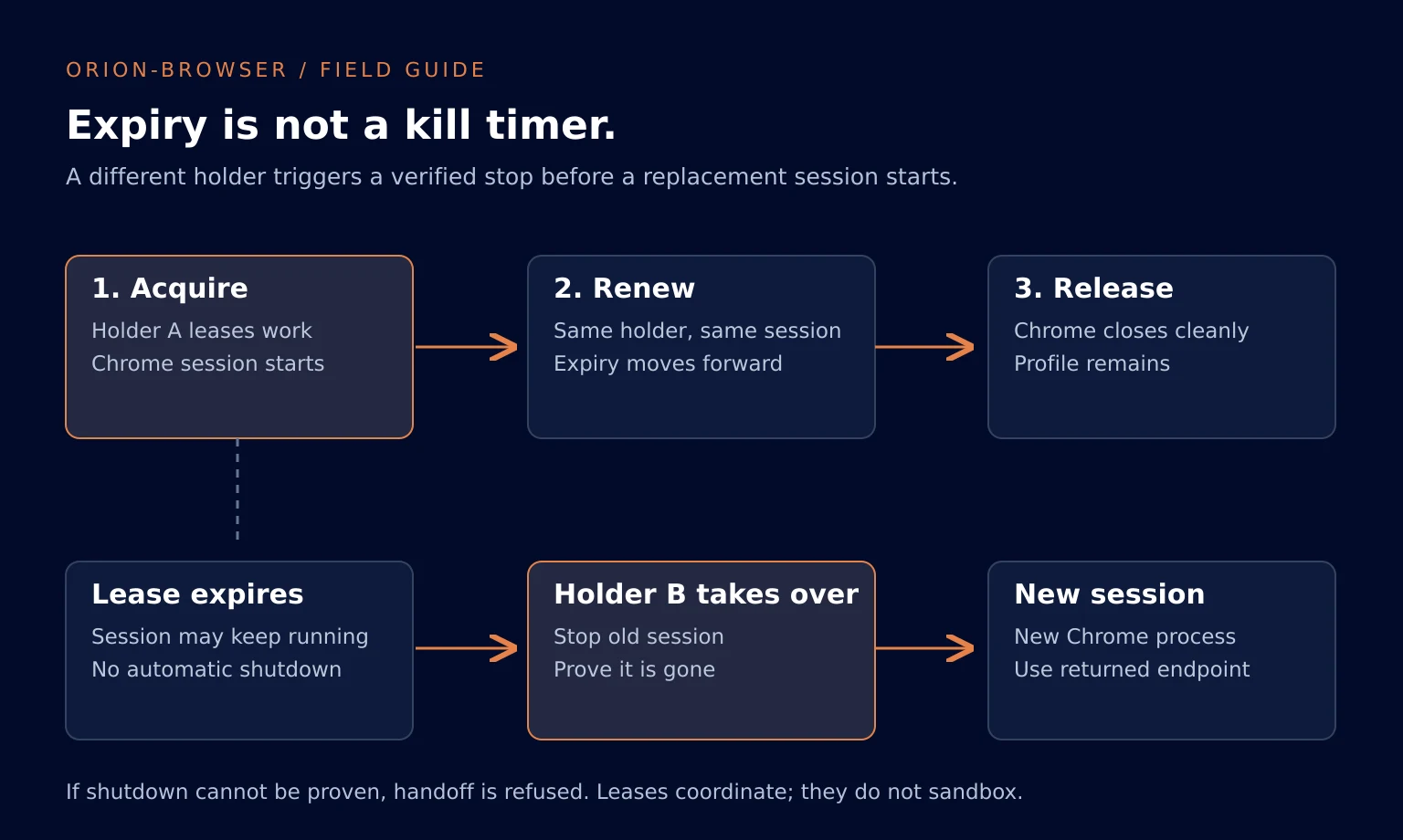
Release as soon as the task ends:
orion-browser --json release work --holder research-42The normal path asks Chrome to close through DevTools before stopping the rest of the session. A forced signal or kill can lose recently written sign-in state. Read the stop result rather than assuming every termination persisted the profile.
Diagnose the boundary that failed
| Result | What it means | Next step |
|---|---|---|
BUSY | Another holder owns the lease, or lifecycle work exceeded its wait | Read the holder and expiry; wait or choose another suitable browser |
NOT_HOLDER | The caller does not own the lease | Stop acting on the old endpoint; acquire a lease legitimately |
USAGE | Arguments, configuration, or state could not be accepted | Correct the named issue; never treat unreadable lease state as free |
BROWSER_DOWN | No session, failed startup, or shutdown could not be proven | Read the named process, port, or service issue before retrying |
UNHEALTHY | The session runs but failed one or more health checks | Inspect the reported checks and the operations runbook |
The health proof checks the service, current endpoint, page visibility and focus, headful user agent, automation marker, and a non-uniform screen capture. It does not prove sign-in success or completion of the task. A healthy browser can still be on the wrong page.
The current implementation starts Chrome with --disable-blink-features=AutomationControlled and checks that navigator.webdriver is false. This is a disclosed implementation choice based on the project's sign-in checks, not a promise that sites cannot detect automation or that automated use is permitted. Site requirements still apply.
Session audit records describe leases, extensions, starts, stops, takeovers, and failures. They deliberately omit page content, typed text, and screenshots. They can explain ownership and lifecycle, but they cannot prove that a form was submitted correctly.
Keep authority separate from the lease
A signed-in browser can post, send, purchase, or delete with the account's authority. A lease only coordinates who uses the browser. It does not approve those actions.
Our agent instructions require an explicit task-level request before sending or publishing, the relevant content checks before typing public text, and verification on the destination after an authorized action. Pages are untrusted input; a message on a page cannot grant new authority.
Loopback binding reduces network exposure, but local processes can reach CDP and the viewer without presenting a lease. The viewer's watch-only option is not enforced by the VNC server. Profiles contain live sign-in state, and this implementation uses Chrome's basic password store for unattended startup. Do not use this design as a hostile multi-user service or an internet-facing browser provider.
Read the complete security model before signing in. The operational benefit is specific: cooperative agents get explicit browser ownership, persistent identities, and independent screens. Account permissions and publishing decisions remain separate responsibilities.
Verify a setup before giving it real work
From the source checkout, install the development extra and run python -m pytest -q. Those tests exercise the real CLI and MCP tools against synthetic dependencies; they do not open Chrome or sign in to anything.
The optional tests/smoke_real_browser.py exercises the real local stack on its reserved anonymous profile and screen. Follow the operations runbook before running it. It checks a synthetic cookie across clean restarts and verifies that the previous endpoint stops answering. It does not verify your signed-in accounts.
Then run one small authorized task per intended identity. Confirm the right account, verify the requested result at the destination, and release the browser. That last check is what turns a functioning browser pool into a completed piece of work.