How to regression-test an AI agent after a prompt or model change
Keep the inputs and behavior contract fixed, change the prompt or model, and check properties that must remain true. A response can look plausible and contain every required field while its invoice total is wrong. Proctor catches that failure with a hard invariant.
What should an agent regression test check?
Check the behavior you depend on: required fields, exact business rules, allowed actions, and task-specific evidence. Run the same representative inputs against the baseline and the candidate. Treat a broken hard rule as a failure even when an evaluator likes the response. Keep subjective quality checks separate so a better turn of phrase cannot excuse an incorrect amount.
Scope: this walkthrough tests invoice extraction using deterministic, synthetic outputs. It demonstrates regression detection and review routing. It does not measure a live model's accuracy, certify an invoice for payment, or install a production execution gate.
Reproduced evidence: at Proctor commit ed7b11a, five fixtures produced 45 of 45 passing assertions for the good path and 40 of 45 for the deliberately degraded path. Every failure was the invoice-total invariant; the classifier returned real-regression. The verification record names the source, commands, and limits. The Proctor project page gives the broader project context.
One plausible answer, one concrete failure
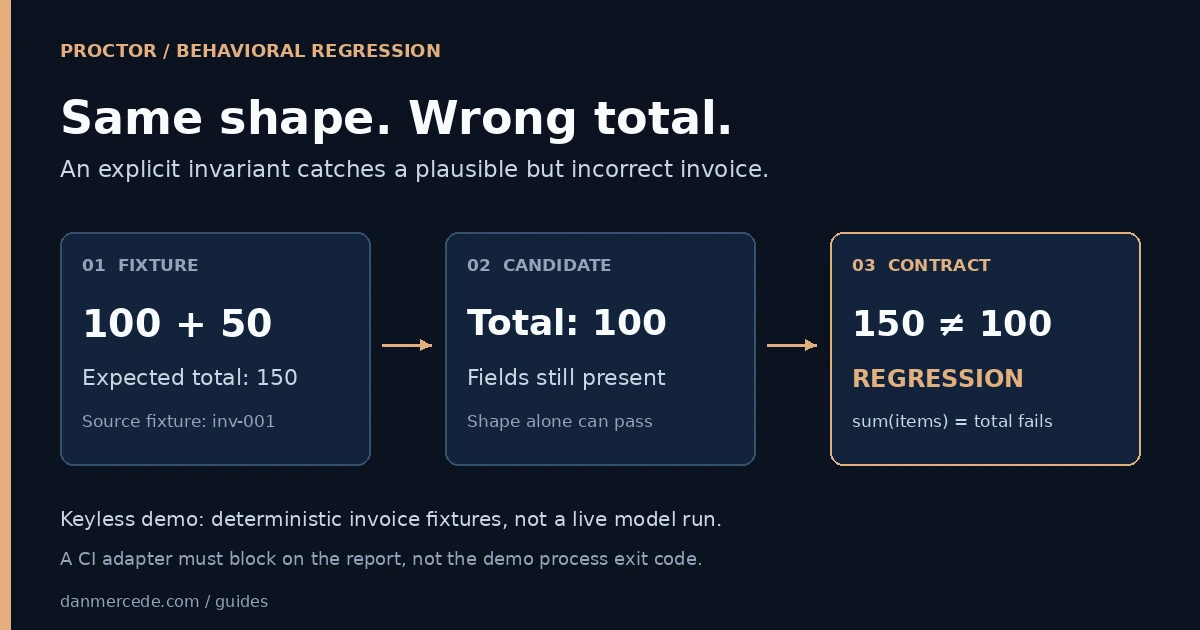
The first upstream invoice fixture has line items of 100 and 50. The good extractor returns 150. The deterministic degraded extractor returns only the first item's amount, 100. Both responses contain vendor, currency, date, line_items, and total.
| Check | Good output | Degraded output |
|---|---|---|
| Required fields are present | Pass | Pass |
| Vendor is nonempty | Pass | Pass |
| Currency is consistent | Pass | Pass |
| Date is parseable | Pass | Pass |
| Line items sum to the reported total | 100 + 50 = 150: pass | 100 + 50 != 100: fail |
A schema or presence check alone cannot catch this bug. The sum invariant compares the reported total with the line-item sum, using an absolute tolerance of 1e-6 in this implementation. The classifier recognizes an invariant failure before calling its optional reasoning dependency. That is the property this example proves.
The keyless learner produces this contract for the demo fixtures:
{
  "sutId": "invoice",
  "version": 1,
  "fields": [
    { "name": "vendor", "kind": "structural" },
    { "name": "currency", "kind": "structural" },
    { "name": "date", "kind": "structural" },
    { "name": "line_items", "kind": "structural" },
    { "name": "total", "kind": "structural" }
  ],
  "invariants": [
    "sum_line_items_eq_total",
    "currency_consistent",
    "vendor_nonempty",
    "dates_parseable"
  ]
}
Here, structural means present and non-null. It does not establish a field's correct value. The invariant implementations supply the concrete checks named in the contract.
Run a small example without dependencies
Download invoice-contract.mjs, inspect it, and run it with Node.js 20 or later:
node invoice-contract.mjsExpected output:
PASS baseline
PASS formatting
BLOCK regressed: sum_line_items_eq_total: expected 15000, received 10000
3 expected decisions reproduced. No model or production tool was called.
This is a standalone teaching fixture, not a replacement for the Proctor engine. It expresses amounts as integer cents, permits the vendor's capitalization to change, and rejects a mismatched total. It makes no network requests and writes no files. Its three cases let you check that the contract accepts a known-good result, tolerates one harmless variation, and catches the specific regression.
To inspect one decision with a meaningful process exit code:
node invoice-contract.mjs --check baseline
node invoice-contract.mjs --check formatting
node invoice-contract.mjs --check regressed
The first two exit with 0. The deliberately regressed case prints passed: false and exits with 1. An unknown fixture or invalid argument exits with 2. The default three-case demonstration exits successfully when all three expected decisions occur, including the expected block.
A sum check proves internal consistency. An extractor that changes both the line items and the total to matching but incorrect values can still pass it. Add checks against the source invoice and task-specific expected facts before using an extraction result in a real workflow.
Reproduce the Proctor result
The upstream project specifies Node.js 20+ and pnpm 9.12.0. Start from the pinned commit so the walkthrough and implementation agree:
git clone https://github.com/OrionArchitekton/proctor.git
cd proctor
git checkout --detach ed7b11a156cacfc23b646eeb370fab376cbe6d66
pnpm install --frozen-lockfile
PROCTOR_FAKE_LLM=1 PROCTOR_GATEWAY=local pnpm demo
The environment assignment shown is Bash syntax. It forces the keyless fake extractor and local gateway even if your shell already contains other settings. The demo script learns a contract, runs both model labels, classifies the failure, and creates a local approval-task record.
The result to look for is:
GOOD:       allPassed: true  (45/45 assertions)
DEGRADED:   allPassed: false (40/45 assertions)
Failure:    sum(line_items.amount)=150 total=100
Verdict:    real-regression
Rationale:  invariant violated: sum_line_items_eq_total
This is a condensed excerpt of the executed run; the other four invoices fail the same invariant. Five structural fields plus four invariants make nine assertions per invoice, or 45 across the five fixtures. In keyless mode, the field proposer deliberately chooses structural checks for every field. The value-level protection here comes from the invariants.
For this guide's review, the installed demo script ran with node --import tsx scripts/seed-demo.ts under the same two environment settings. That runs the script behind pnpm demo without the CLI's IPC listener. The upstream unit suite passed 77 tests, and the separate durable-workflow integration test passed one suspend/resume cycle. These runs used the local gateway and fake extractor; they did not call a paid model or a live UiPath tenant.
What happens after the failure?
The narrated demo creates a local task record. It does not start the durable workflow runtime, send a real UiPath task, or prove a process restart can resume an approval. The separate upstream commands are pnpm dev for the local dashboard and pnpm test:int for the suspend/resume integration test.
In the workflow implementation, passing reports complete; a flaky verdict is recorded; real-regression and legitimate-evolution wait for a human decision. Only approved legitimate evolution with a proposed patch versions the contract. Approving a real regression does not rewrite the contract or change the failed report into a pass.
For a quick visual comparison, open the Proctor drift scenario on Proof. That simulator illustrates the difference between an advisory warning and a held action. It is a separate browser demonstration, not the Proctor test runner.
How do you turn this into a merge gate?
Keep the demo and release decision separate. pnpm demo returns success when the demonstration finishes, even though it deliberately detects a regression. Its process exit code is not a ready-made CI approval signal.
An integration for your agent should run the candidate through the contract and fail its required check when report.allPassed is false or the run is incomplete. Keep the report as evidence. If you allow a reviewer to approve legitimate evolution, version the reviewed contract and rerun the candidate against that version before accepting the change.
Use a review packet with enough information to reproduce the decision:
| Record | Why it matters |
|---|---|
| Baseline and candidate revisions | Identifies the actual prompt, model configuration, and adapter being compared |
| Fixture revision and contract version | Keeps the target behavior from silently moving with the candidate |
| Per-case results and raw outputs | Shows which rule failed and which input caused it |
| Repeated runs for variable behavior | Helps separate intermittent failures from stable drift |
| Reviewer, decision, and resulting version | Makes any accepted behavior change explicit |
For a live agent, change one variable at a time where practical. Keep the input set fixed and run enough repetitions for the behavior you are assessing. A pass over five synthetic invoices does not establish a production error rate. A merge gate also needs repository enforcement; a green local command alone cannot stop a merge. See The Merge Is a State Mutation for that separate boundary.
What this version does not cover
Proctor's current runner compares exact and semantic fields with the first value it sees in that run. It does not persist a separate expected reference for every fixture. A consistently wrong candidate can therefore establish its own field-level baseline, and diverse inputs need careful handling. The hard sum invariant still detects the failure shown above.
The local approval endpoint also lacks production authentication and reviewer authorization. Use the dashboard locally for evaluation; an operational integration needs authenticated decisions and server-side task validation. These are concrete limits of the implementation, not evidence that a particular model is safe or unsafe.
Start with one failure that matters to your workflow. Write the rule that would have caught it, preserve its input as a fixture, and demonstrate both the pass and the failure. That gives the next prompt or model change an observable decision instead of another subjective reread.