Giving Your Coding Agent Web Access Without Wrecking Its Context Window
Point a coding agent at a docs page and it swallows the HTML: nav, ads, cookie banners, script tags, the lot. One page I measured was 9,541 tokens raw and 1,678 as clean markdown. That 82% is the easiest token saving you will find, and the default fetch tool leaves it on the table.
Most coding agents get web access the lazy way: a fetch tool that returns raw HTML, a search tool wired straight into the main context, and a metered API behind both. It works in a demo. Then the agent reads three documentation pages, and half its context window is <div class="nav"> and inline analytics.
I spent a day hardening the web-access layer for my own agents and measured every option on two axes almost nobody ranks first: cost and rate-limit resilience. The result is a stack that is free or self-hosted for the load-bearing paths, plus one structural pattern that matters more than any single tool: keep raw pages out of the main context by design.
This guide is the version I wish I had at the start. Every number is from a public source or a run you can repeat.
Who this is for: anyone giving an autonomous agent (Claude Code, a -p headless pipeline, Codex, an in-house harness) the ability to search, read, and drive the web, and paying for the tokens.
Why does giving an agent web access wreck its context window?
Because raw HTML is mostly not content. In one measured fetch, the same page was 9,541 tokens as raw HTML and 1,678 tokens as clean markdown, an 82% reduction. Typical HTML-to-markdown conversion lands nearer 20 to 30%, but the direction is constant: you are paying to put boilerplate into the model's attention, then paying again on every following turn.
The waste compounds three ways. Context flood: a large docs page is roughly 25,000 tokens of input, and it stays resident for the rest of the conversation. Cost: search results and fetched content are billed as input tokens on the turn they arrive and every turn after, so a page you read once is re-billed until it ages out. Rate limits: point a fan-out of parallel agents at a metered search API and you hit 429 almost immediately. The lazy path fails on all three at once.
Context rot is the quiet one. Even on a large context window, recall degrades as the window fills. A page of HTML you never needed is not free just because it fit.
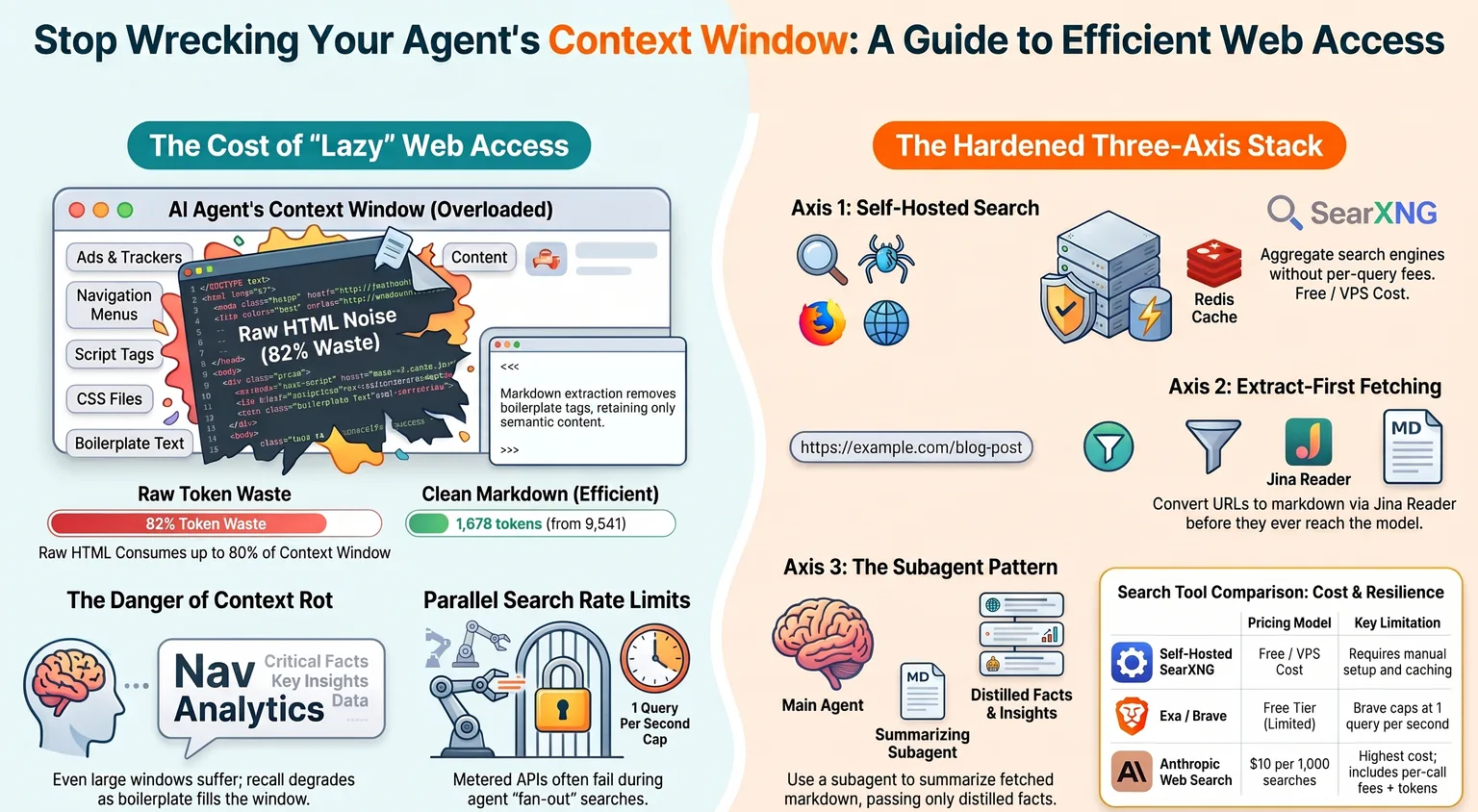
What are the three axes of agent web access?
Web access is not one capability, it is three, and they want different tools. Search (find the URLs), fetch (read a page without drowning in it), and browser automation (click, fill, scroll a live app). In a 2026-07 review of the field, the cheapest resilient answer differed per axis: self-hosted for search and fetch, local-and-free for the browser.
Conflating them is how people end up overpaying. You do not need a headless Chromium to read a blog post; an extract-first markdown fetch handles the large majority of retrieval. You do not need a metered search API to read a page whose URL you already have. Name the axis, then pick the cheapest tool that covers it. Reserve the expensive, stateful browser for genuine interaction: clicks, forms, infinite scroll, auth walls.
The rest of this guide takes the axes in order, cheapest and most rate-limit-resilient first.
What is the cheapest, most rate-limit-resilient search stack?
Self-hosting wins outright. A self-hosted SearXNG metasearch instance runs on a 5 to 10 dollar per month VPS, aggregates roughly 95 to 200 engines (Google, Bing, Brave, DuckDuckGo and more) behind a JSON API, and charges nothing per query. Put a Valkey or Redis cache in front of it, because individual upstream engines rate-limit a single client IP hard, and the cache is what absorbs that.
If you want a hosted API instead, rank by the free tier and the rate cap, not the marketing. Exa gives 20,000 free requests a month. Brave gives about 1,000 free queries a month but caps the free tier at 1 query per second, which breaks the instant you do parallel fan-out search, a common agent pattern. Perplexity Sonar and Kagi are metered with no meaningful free tier. Anthropic's native web_search is the priciest per call at 10 dollars per 1,000 searches plus token costs, though its companion web_fetch adds no per-fetch fee and ships a max_content_tokens cap worth using.
One honest caveat carried from the research: a "Serper plus a reader" stack was reported at about 11 dollars a month for 10,000 searches and 10,000 extractions, against roughly 96 dollars for a single-vendor API on the same workload. That specific figure rests on a single blog and should be read as directional. The ranking (self-hosted free, then Exa/Brave free tiers, then metered) is the corroborated part.
What is the cheapest way to read a page without flooding context?
Extract-first, markdown, in that order. The single biggest lever is converting a page to clean markdown before it reaches the model, which cut tokens 82% in the measured case above. Jina Reader is the cheap default: prefix any URL with the reader endpoint and you get markdown back, free at 20 requests per minute with no key, or 10 million tokens on a free key, and it is open-source so you can self-host it. Trafilatura is a self-hosted Python extractor with no API cost and strong extraction quality, though it will not render JavaScript.
For scraping proper, the same free-first ranking holds. Crawl4AI is Apache-2.0 with no per-page fees; your only cost is the box it runs on. Managed Firecrawl trades that for convenience at roughly 83 dollars a month on its standard tier. The crossover is volume: at low and mid volume the managed credits are cheaper than running infrastructure; past high volume, the self-hosted crawler wins. Pick the tool, but do the markdown conversion no matter which you pick. Handing a model raw HTML is the mistake; the extractor is incidental.
Why does a thin CLI beat an MCP server for agent web tools?
Because an MCP server costs context on every host, and a CLI costs almost none. As of 2026-07, Claude Code defers MCP tool schemas until a tool is invoked, so an MCP is cheapish there. But Codex has no such deferral: every MCP schema loads in full, every session, and a harness that already carries a dozen servers pays that tax constantly. A thin CLI you shell out to via Bash costs close to zero resident context until the moment you call it.
So for anything I want available on more than one agent host, I ship a CLI, not an MCP. I built three this way: a search CLI over a grounded-answer API, a live-social search CLI, and a page-reader over Jina. Each self-wraps its own secret retrieval (read the key from the environment, or transparently re-run under a secrets manager if it is not set) so the caller passes no credentials, and each takes a --json flag so an agent can parse it. One implementation, every host, near-zero context. The rule generalizes: prefer a working CLI over its MCP unless the tool genuinely needs a stateful session.
Browser automation is the one real exception. Playwright, driving a real browser, is stateful and does not reduce cleanly to a stateless CLI, so it stays an MCP or an in-process library. There, the free-and-local option still wins: Playwright is Apache-2.0, runs on your own machine at zero LLM cost, and hits about 98% reliability on deterministic scripts. Running Playwright's MCP in its CLI mode reportedly cuts token use about 4x versus the protocol mode. Metered cloud browsers exist (Browserbase, Stagehand's hosted tier) but the free tiers are thin (Browserbase caps the free tier at 1 browser-hour, 3 concurrent sessions, 15-minute sessions), so reserve them for scale you have actually hit.
How do you build the fetch tool, and why run it in a subagent?
Because the tool only wins if the raw page never reaches the main agent at all. The pattern is small: a fetch CLI that returns bounded markdown, invoked inside a subagent whose job is to read the page and return only the distilled slice the main agent asked for. The main context sees a paragraph, not 25,000 tokens. Even the markdown never lands in the parent conversation.
The fetch CLI itself is about 120 lines. The load-bearing parts:
import math, os, urllib.request  # the full CLI also imports json (for --json) and sys

READER = "https://r.jina.ai/"
# The default python-urllib User-Agent gets a 403 from the reader's bot filter.
# Send a real browser UA. This one line is the difference between 200 and 403.
UA = os.environ.get("WEB_READ_UA",
    "Mozilla/5.0 (X11; Linux x86_64) AppleWebKit/537.36 "
    "(KHTML, like Gecko) Chrome/126 Safari/537.36")

def fetch(url, key=None):
    req = urllib.request.Request(READER + url, method="GET")
    req.add_header("User-Agent", UA)
    req.add_header("X-Return-Format", "markdown")
    if key:                                  # optional, raises free-tier limits
        req.add_header("Authorization", f"Bearer {key}")
    with urllib.request.urlopen(req, timeout=60) as r:
        return r.read().decode("utf-8", "replace")

def budget(md, max_tokens):
    # A stdlib token estimate: ~4 chars per token. Label it estimated.
    est = math.ceil(len(md) / 4)
    if not max_tokens or est <= max_tokens:
        return md, est, False
    return md[: max_tokens * 4].rstrip() + "\n\n... [truncated]", max_tokens, True
Three details earn their place. It is keyless by default (the reader's free tier needs no key), so the tool works with zero setup and only reaches for a key to raise limits. It carries a token budget (--max-tokens), so a runaway page cannot blow the context even inside the subagent. And it emits --json so the calling agent gets structured output, not a wall of text. The browser User-Agent is the one non-obvious line: a live smoke test, not the unit tests, is what caught the reader returning 403 to the default python-urllib agent. Unit tests pass with a mocked network; only exercising the real endpoint surfaces that class of bug.
What should you actually adopt?
Start free and self-hosted, add metered tools only where you have measured a need. As of 2026-07 the stack I run is: self-hosted SearXNG behind a cache for search, a keyless Jina-backed reader CLI for fetch (run in a subagent so raw pages never hit the main context), a self-hosted crawler for bulk scraping, and local Playwright for the genuine browser work. Native provider search sits behind all of it as a metered last resort.
The through-line is not a specific tool, it is two rules. Convert to markdown before the model sees a page, which reclaims most of the token bill on day one. And offload the fetch to a subagent, so the raw content, even cleaned, is summarized down before it touches the conversation the main agent has to keep coherent. Everything else is a cost-and-rate-limit optimization on top of those two moves.
The takeaway
Giving an agent web access is easy; giving it web access that does not quietly bankrupt its context window takes two deliberate choices. Extract to markdown, and read in a subagent. Do those, rank every tool by free-tier and rate cap before you reach for a paid API, and prefer a thin CLI over an MCP for anything that is not a stateful browser. The lazy path costs you a large slice of your web-read tokens, up to 80% on a boilerplate-heavy page, and a 429 under load. The fix is a day of plumbing and a 120-line script, and it pays for itself the first time your agent reads the docs.